How to get my edited ringtone?

You might have gone to many ringtones sites to get a good quality ringtone but here someday’s before i found a site which let me to upload my selected song cut it and make it ringtone and then also let me to download it.
How to get my edited ringtone

Even not only that this site is like a mp3 cutter(not only mp3 you can edit wma also and many more).So i want to share my experience with the site with you.
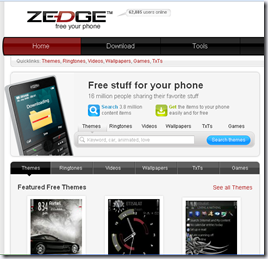
How to get my edited ringtone

The site is http://www.zedge.net/ 

Features :

    • Download : You can download the ring tones what others have created.To do this please follow the steps :-
        1. Go to http://www.zedge.net/
        2. Click on Download Button.(Look at the below image)

                                  How to get my edited ringtone

                                   3.  Now click on Ringtones.

                                   How to get my edited ringtone

                                   4.  Now select the ringtone that you like and press get ringtone.

                                     How to get my edited ringtone

                                   5. It will open a window like below image.Click On Pc Download.

                                     How to get my edited ringtone

                                   6. After that a window will come and ask you to save.You just press the save button and your ringtone will start download.

Wish To See : How to create my cool cursor?

    • Upload Edit And Download :

  Now to upload a song/mp3 you need to first create a account in Zedge.Then they will allow you to upload a file and transfer to ringtone using ringtone-maker.

Steps to do it :

1. Enter your account in Zedge and Goto Ringtone-maker.

How to get my edited ringtone

2. It will open a Window like below :

How to get my edited ringtone

3. Here you can upload files and edit them using Ringtone-maker to transfer it to a ringtone. 

    • File Will be uploaded like below :

                    How to get my edited ringtone

4. Now when the file upload is complete you will represented with an window like below :

How to get my edited ringtone

5. You can adjust your ringtone within that selected frame and now when you finish the part of the song that you want as your ringtone your have to press the done button in the above image and they will let you to download that ringtone and in this way you can create your own ringtone.


# How to stop copying contents of my blog?

If you are thinking that some one can copy your post any paste it in his blog then you are right anyone can do it but you can stop copying contents of your blog. It is really simple. Just you have follow a simple way and you can protect your blog from copying contents.

How to stop copying contents of my blog

Actually this is a code which disables right click on your blog so no one can copy the contents of your blog.In this way you blog is safe.

Wish To See : How to create my cool cursor?

Now to do this please follow the following steps :-

  • Open blogger account –> Go to Dashboard –> Layout –> Add Gadget –> Html/Javascript
  • Copy the below code and paste it there :

<script language=”JavaScript”>
<!–

//Disable right mouse click Script
//By Maximus (maximus@nsimail.com) w/ mods by DynamicDrive
//For full source code, visit http://www.dynamicdrive.com

var message=”Function Disabled!”;

///////////////////////////////////
function clickIE4(){
if (event.button==2){
alert(message);
return false;
}
}

function clickNS4(e){
if (document.layers||document.getElementById&&!document.all){
if (e.which==2||e.which==3){
alert(message);
return false;
}
}
}

if (document.layers){
document.captureEvents(Event.MOUSEDOWN);
document.onmousedown=clickNS4;
}
else if (document.all&&!document.getElementById){
document.onmousedown=clickIE4;
}

document.oncontextmenu=new Function(“alert(message);return false”)

// –>
</script>

To know More Goto the Link : – Source -


# How to get Orkut scraps in your mobile as free SMS?

If you are thinking of your orkut account that now who is posting scrap in your account but you have nothing to do.Cyber-cafe is closed now.

How to get Orkut scraps in your mobile as free SMS

So from where I will get the scrap!! Really a matter to think.No more :) You can get orkut scraps in your mobile as free SMS without internet connection.

Wish To See : ## How to open two orkut accounts simultaneously?

To get the Orkut scraps in your mobile as free Sms you need to do the following things :

  1. First Go to mobee.in and submit your mobile number there.By joining there you will get a email id like this <your mobile number>@mobee.in. Any email received in this email id will be forwarded to your mobile number as Free SMS(10 free SMS per day.)
  2. Change setting of your orkut account through you will get copy of all scraps in your Gmail account.
  3. Now open your Gmail account and set the option to filter and forward your orkut scrap to your mobee.in email id.Choose filter word Orkut.If you do like this then  a copy of filtered mail will be sent to your mobee.in email id.Click below to know how to set this setting in to mobee.in mail id.

        - Gmail Settings -

   4. Mobee.in will forward this scrap to your mobile number through SMS.


It means when someone types any scrap in orkut this scrap will forward to Gmail account after that it will transfer to mobee.in emailid and at last the scraps will come to your mobile as SMS.(All scraps will be filtered) 

# Excellent torrent search sites(Top 36).

## Windows 7 installation Using USB.

Windows 7 can be installed using a USB/Pen Drive.You just need a 4GB/8GB Pen Drive and a .ISO Windows7 image.

Windows 7 installation Using USB

No need for anything else, the official Windows 7 USB installer does it for you. Various guides available on internet show you how to make your USB bootable with Win7 setup in a series of setups which include formatting USB drive to NTFS, setting it as active, copying files and then finally executing a command-line exe to make it as bootable.

I’m gonna show You something Different—Let’s Start--

First you have to download and install the Windows 7 USB/DVD Creator which will automatically make your USB drive bootable and install Windows 7.

You can download it from the following link:

Download Windows 7 USB/DVD Download Tool

After downloading and installing the tool, when you launch it, it’ll ask you to select the path where you have stored Windows 7 ISO file:

Windows 7 installation Using USB

You just Provide the ISO file path and click on “Next” button. Now it will ask for whether you want to create bootable USB drive or DVD:

Windows 7 installation Using USB

Click on the desired button. If you select “USB Device”, it’ll ask you to insert the USB device. If your USB device is compatible, it’ll be automatically detected by the tool:

Windows 7 installation Using USB

Click on “Begin Copying” button. Now you’ll be transferred to format the USB device. Accept the confirmation:

Windows 7 installation Using USB

That’s it.You have done it successfully!! The tool will start copying the installation files to USB device:

Windows 7 installation Using USB

At last, it’ll show a message that “Bootable USB device created successfully”.

Windows 7 installation Using USB

System Requirements:

  • Windows XP SP2, Windows Vista, or Windows 7 (32-bit or 64-bit)
  • Pentium 233-megahertz (MHz) processor or faster (300 MHz is recommended)
  • 50MB of free space on your hard drive
  • DVD-R drive or 4GB removable USB flash drive

Vidio Tutorial :

[Link] – Download Windows 7 USB/DVD Download Tool

Frequently Asked Questions :

The following are some frequently asked questions and answers about using the Windows 7 USB/DVD Download tool:

What size USB flash drive is required?
You need a USB flash drive with a minimum of 4 GB of free space.

Can I use my newly created USB drive to install Windows 7 on someone else’s computer?
No. The Windows 7 ISO file on the USB flash drive is only intended to be used to install Windows 7 on the licensed user’s own computer.

Can I backup to a CD-R?
No. The Windows 7 ISO file is too large to fit on a CD.

Can I backup to a Blu-Ray DVD disk?
Yes, as long as your DVD drive can write to a Blu-Ray DVD.

If I have other files on the USB flash drive will the Windows 7 USB/DVD Download tool delete them?
This tool requires the USB flash drive to be completely blank before the Windows 7 files are copied. This helps ensure that the device is bootable after the copying has completed.

Can I backup to an iPod, camera, or other device with enough free disk space?
Yes, but this is not recommended. The device must be formatted in order for the device to be bootable.

Can I use the Windows 7 USB/DVD Download tool to backup other files?
No. This tool is only for use with the Windows 7 ISO file purchased from Microsoft Store.A dedicated USB flash drive would be a better option.

I hope You will successfully install Windows7 using USB drive.

PAUSE OFF HEADLINES --