How to get my edited ringtone?

You might have gone to many ringtones sites to get a good quality ringtone but here someday’s before i found a site which let me to upload my selected song cut it and make it ringtone and then also let me to download it.
How to get my edited ringtone

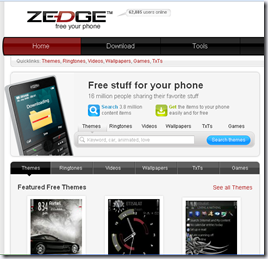
Even not only that this site is like a mp3 cutter(not only mp3 you can edit wma also and many more).So i want to share my experience with the site with you.
How to get my edited ringtone

The site is http://www.zedge.net/ 

Features :

    • Download : You can download the ring tones what others have created.To do this please follow the steps :-
        1. Go to http://www.zedge.net/
        2. Click on Download Button.(Look at the below image)

                                  How to get my edited ringtone

                                   3.  Now click on Ringtones.

                                   How to get my edited ringtone

                                   4.  Now select the ringtone that you like and press get ringtone.

                                     How to get my edited ringtone

                                   5. It will open a window like below image.Click On Pc Download.

                                     How to get my edited ringtone

                                   6. After that a window will come and ask you to save.You just press the save button and your ringtone will start download.

Wish To See : How to create my cool cursor?

    • Upload Edit And Download :

  Now to upload a song/mp3 you need to first create a account in Zedge.Then they will allow you to upload a file and transfer to ringtone using ringtone-maker.

Steps to do it :

1. Enter your account in Zedge and Goto Ringtone-maker.

How to get my edited ringtone

2. It will open a Window like below :

How to get my edited ringtone

3. Here you can upload files and edit them using Ringtone-maker to transfer it to a ringtone. 

    • File Will be uploaded like below :

                    How to get my edited ringtone

4. Now when the file upload is complete you will represented with an window like below :

How to get my edited ringtone

5. You can adjust your ringtone within that selected frame and now when you finish the part of the song that you want as your ringtone your have to press the done button in the above image and they will let you to download that ringtone and in this way you can create your own ringtone.

Secret Codes for Nokia.(Top 16)

Type the folling codes in NOKIA main screen.
1) *#06# for checking the IMEI. (International Mobile
Equipment Identity).
Nokia_secrets

 2) *#7780# reset to factory settings.
3) *#67705646# This will wash  the LCD display
(operator logo).
4) *#0000# To view software version.
5) *#2820# Bluetooth device address.
6) *#746025625# Sim clock allowed status.
7) *#62209526# - Display the MAC address of the
WLAN adapter.8)  #pw+1234567890+1# Shows if sim have restrictions.
9) *#92702689# - takes you to a secret menu where
you may find some of the information below:
1. Displays Serial Number.
2. Displays the Month and Year of Manufacture
3. Displays (if there) the date where the phone was
purchased (MMYY)
4. Displays the date of the last repair - if found
(0000)
5. Shows life timer of phone (time passes since last
start)
10) *#3370# - Enhanced Full Rate Codec (EFR)
activation. Increase signal strength, better signal
reception. It also help if u want to use GPRS.
11) *#3370* - (EFR) deactivation. Phone will
automatically restart. Increase battery life by 30%
because phone receives less signal from network.
12) *#4720# - Half Rate Codec activation.
13) *#4720* - Half Rate Codec deactivation.Then the phone will restart.
14) wallet code for Nokia S60 phone, use this code to reset: *#7370925538#.
15)*#3925538#  delete the contents and code of wallet.
16) *#7328748263373738# resets security code.

PAUSE OFF HEADLINES --